
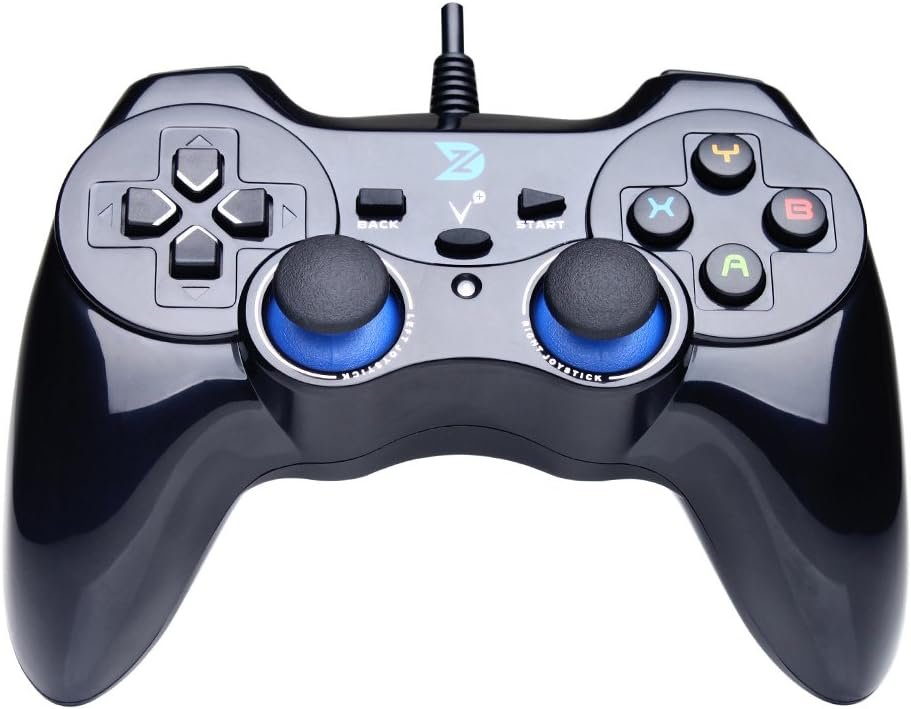
ZD-V+ USB Wired Gaming Controller Gamepad For PC/Laptop Computer(Windows XP/7/8/10/11) & PS3 & Android & Steam – [Black]
$19.99
Related Products


Product description
ZD-V+ USB Wired Gaming Controller Gamepad For PC/Laptop Computer(Windows XP/7/8/10/11) & PS3 & Android & Steam – [Black]

ZD-V+ Wired Game Controller / Gamepad
ZD-V+ controller is compatible with PC Windows (Xp/7/8/10) or later versions, Android 4.0 and PS3 via wired connection, working great with Laptop/PC, Android smart phones, TV boxes, tablets and PS3. This game controller can identify all the deices automatically, no need driver installation.
Matters Needing Attention
The device doesn’t support Xbox 360 / Xbox One / Mac OS / PS4.DirectX 9.0c or above may be installed if the device is to be used in Windows 10 or above.If the device is unable to be used in Windows systems, please try to install the latest version of Microsoft Xbox 360 Controller gamepad driver.The vibration-feedback function can only be used in PC games supporting Xinput mode and the function may need to be enabled in games.If you want to use the controller in devices with Micro-USB interfaces, you need to purchase OTG adapter or cable separately.
Package List
1x English Instruction Manual1x ZD-V+ Wired Gamepad(equipped with 1.5M USB cable)

Feature
(1) It supports plug and play, only for PC games supporting Xinput mode / Play Sation 3. Some games may need to set the buttons or use third-party software before use.
(2) Vibration Feedback Function.
(3) Multi-mode: Xinput / DirectInput(D-input).
(4) JD-SWTICH Function, which can exchange the functions of D-pad and Left-Stick in Xinput mode.
(5) Product Size: 150x105x65mm
(6) Product Weight: 216g
(7) Supporting Interface: USB 2.0 / 3.0

Excellent Design
Ergonomic, and excellent design with high-quality material.
ZD-V+ controller features brief and smooth streamline, it feels firmly, and comfortable to your palm with the texturing in the surface. The layout of the buttons is so humanized as to operate fluently and efficiently.

JD-SWITCH Function
This feature is very powerful, you can use the D-pad or Left-stick follow your heart in the game.
In PC Windows and Xinput mode, you can switch the function between D-pad and Left Stick by pressing the BACK + LSB(press the Left Stick vertically) key combinations.

High Precision D-pad
Separated design, give you the best gaming experience, let the game control follow your heart.

Non-slip Joystick
Rough surface, non-slip texture, high precision components, This makes the joystick experience better in the game.

Vibration Feedback
The different vibration intensity allows you to have a real feedback in different scenes of games. The vibration-feedback function can only be used in PC games supporting Xinput mode and the function may need to be enabled in games.
Support PC Windows XP / 7 / 8 / 10 / 11 & PS3 & Steam
Support Android (version 4.0 or above, and the device must fully support OTG function). Not inlciud a OTG adapter in the package.
Support Plug and Play, only for PC games supporting Xinput mode / PS3
Feature: Multi-mode: Xinput & DirectInput / Vibration Feedback Function / JD-SWTICH Function (exchange the functions of D-pad and Left-Stick in Xinput mode)
USB Wired Gamepad (PS architecture) – Does not support the Xbox 360 / Xbox One / Mac OS
11 reviews for ZD-V+ USB Wired Gaming Controller Gamepad For PC/Laptop Computer(Windows XP/7/8/10/11) & PS3 & Android & Steam – [Black]
Add a review
![ZD-V+ USB Wired Gaming Controller Gamepad For PC/Laptop Computer(Windows XP/7/8/10/11) & PS3 & Android & Steam – [Black]](https://balancedher.co/wp-content/uploads/thumbs_dir/61qItTcisGL._AC_SL1000_-ri0aqgwc1tokwcj7tn6kojoght9vlbwpt914cjhzpi.jpg)
$19.99
marful –
works great
Quick shipping, controller was as advertised, plug it in and had to make no adjustments. It was really plug-and-play.
Andrew Stewart –
Great buttons and joysticks, quieter vibration motors
The controller looks amazing, and every button is easily operable with no issues (such as sticking or turning). The joysticks are smooth and click nicely when pressed, and every function translates perfectly to a first-party Xbox 360 controller. The vibrating motors inside are somewhat weaker than Microsoft-produced controllers, but for some people (myself included) this comes as an advantage, due to them being quieter and less disruptive. As stated in the product’s description, it’s not made to work with an actual Xbox 360 (I even tried out of curiosity) but works beautifully with PCs and is detected as a standard Xbox 360 controller when it’s in XInput mode. Overall, I’d highly recommend this controller to anyone who dislikes the strange layout of the Xbox controller (which was the #1 reason for my purchasing this controller).EDIT: Two and a half months later, and the controller is still with me and hasn’t shown any signs of dreaded dead zones yet, which is amazing. The controller still feels like new (despite my using it just about daily) and one thing I’d forgotten to put in my original review is that the D-pad is absolutely stellar. It’s very decisive and not mushy at all, which is beautiful. After a while with the controller, I can confidently say that it’s a perfect choice for just about any type of gaming, and the low cost complements it greatly.
D. Won –
Great controller with some drawbacks
The controller worked perfectly with my games. No issues with drivers or anything. It’s about the size of the original PS3 controllers which was especially useful for me since I have issues with my left hand due to nerve damage. Larger controllers are harder to use because I simply couldn’t open my hand enough to comfortably reach all of the buttons.But there are drawbacks. The R2 and L2 buttons are not trigger style like the PS4 style controllers and are a bit soft. You really got to press down sometimes to register a button press. They seem pressure sensitive but would still miss occasional button presses. The cord length is adequate but could definitely be longer. And there is a weird issue where if you like leaving your controller plugged in even when not in use, Windows will not go to sleep or start the screen saver. So if you have your computer set to sleep after a certain amount of time, be sure to unplug the controller. The inability for Windows to start the screen saver could cause screen burn-in if you’re not careful since your monitor won’t turn off and enter power save mode.
joe –
Awesome
Works great
Michael A –
Decent controller but doesn’t last long
Bought this for $40 in 2019. It’s dead now (2025) – most likely cable failure. 6 years is ok, but $40 could also get you an Xbox One controller that’s built like a tank and will last 10+ years easy. The main problem is that I didn’t really use it all that much. I’m a mouse and keyboard guy — the controller is only for when I’m playing retro games with the kids. So in terms of cost/uses, it wasn’t all that great. I highly recommend treating the cable gently. Don’t wrap it around the controller or tug on it.That being said, whenever I did use it, it worked great. Solid connectivity, good button response, comfortable and accurate analog stick. It works great while it works, but you’re rolling the dice on longevity.
JustSomeRandomGuy –
Great Controller for the money. Feels almost exactly like an old school PS2 controller.
This is a very nice looking controller. The super smooth and click “finish” on it seems a little prone to blisters and “dull spots” with heavy wear, but I don’t intend to play many games where there are “rapid fire” type situations. I have been trying to go through all the old school RPG games from the 80s, 90s and early 2000s that are playable on PC (somehow). After trying to get through the Squaresoft/Square-Enix games on PSx using only a keyboard and mouse, I broke down and got this controller. I have only briefly played with it after “customizing” the button configurations and found it FAR better than my previous USB SNES style controller from over a decade ago before it died.For some reason I wasn’t able to get the shock/vibration feature to work correctly, nor does it state anywhere in the description of this product that the small “vibration motors” are even present in this device, but others have commented that it DOES have this feature so I will continue to play around with settings and see. It’s not a huge deal if it doesn’t, but it does add something to the quality of the game play experience. The “center button” seems to do some pretty neat things like bring up options to record your game play “on-the-fly” (which I will probably never actually use) and other interesting things that might be handy if you are a YouTuber with a gaming channel or something like that.I am not a hardcore gamer (since I’m not 13 anymore) and I don’t need (nor want to spend the big bucks on) the most awesome and amazing gaming gear EVAAAAAAR, so this controller is very ideal for me. The first few dozen times trying out every button when I first took the controller out of the box seemed a little “sticky”. After just 15-20 minutes of use I feel them already loosening up a little with easier “action”. The overall “feel” of this controller is very rigid so it is probably tough enough to survive falling out of a moving box or laptop bag with only a few scrapes, but probably not durable enough to survive getting ran over by a car (or a hot-headed player that is a sore loser).It seems to work perfectly with older Console Emulators and the only thing “missing” from the old school gaming days is the “underneath trigger” and perhaps a “Turbo Switch”. I will likely update my review later if I run into issues like not being able to figure out the shock/vibration feedback, flaky operation or loss of functionality, but for the time being, I feel this product is closer to a 4.6/5.0 given the great value (I paid about $20 for this one in 2017) of a versatile controller that works on my Windows PC and reminds me of being a teenager again. I will round up to 5 stars.
anmol –
It’s a one of the best remotes out there in the market. I’m highly impressed by its qualtiy.Highly recommended product.
mr j –
Works on Windows 11 laptop with Steam games without any set up needed. Good price but not sure how long it will last as the joysticks tend to go quickly with similar ones I have had in the past. I do prefer this layout with the side-by-side joysticks to the more modern design with the d pad where the left stick is.
Amazon カスタマー –
値段もお得だし操作性も良いです。見た目も気に入ってます。
Martin Vizcaya –
Justo lo que esperaba. El control está muy bien hecho. Y funciona muy bien no tuve que configurar nada. Todo lo tomo a la primera
アルヤ –
Very nice